
Students can use My Files to upload documents that support their career portfolio. Uploaded files are viewable by those who have access to the student’s My Career Page.
From the Career Explorer menu in the top navigation bar, select My Career Page.

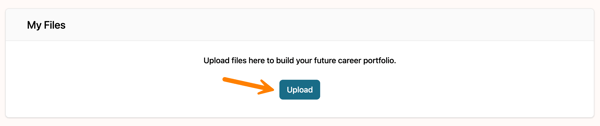
Go to the My Files section and click Upload to start.
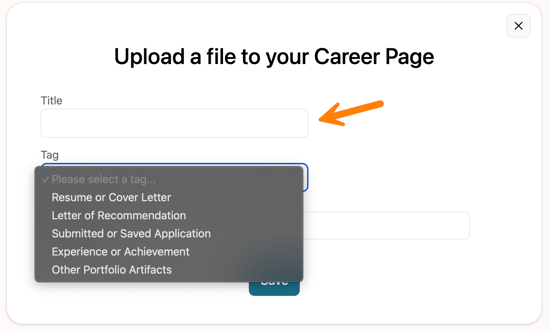
Provide a title, then choose a file tag from the drop-down menu.
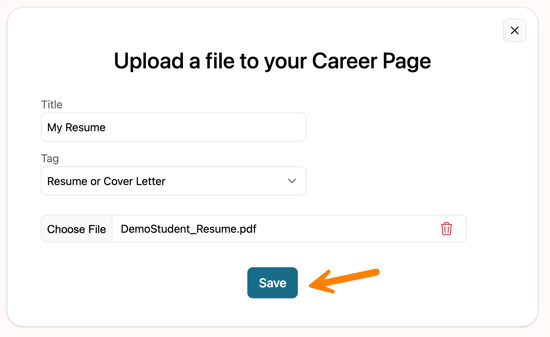
Select the file you want to upload to My Career Page, then click Save.
File Specifications
- Accepted formats include: .xlsx, .docx, .pptx, .png, .jpg, .jpeg, .pdf, .csv.
- Maximum upload size: 5 MB.
- Users can store up to 20 files
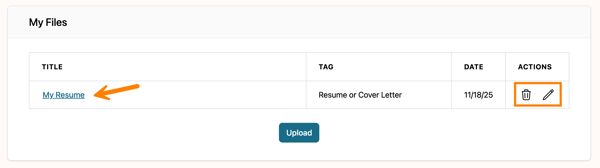
After uploading, the file will be listed on My Career Page. You can open the uploaded file by clicking the title, and you also have the option to edit its details or remove it.
Files are visible to those with access to students' My Career Page, including teachers and/or guardians.